
Change Battle Speed in Settings
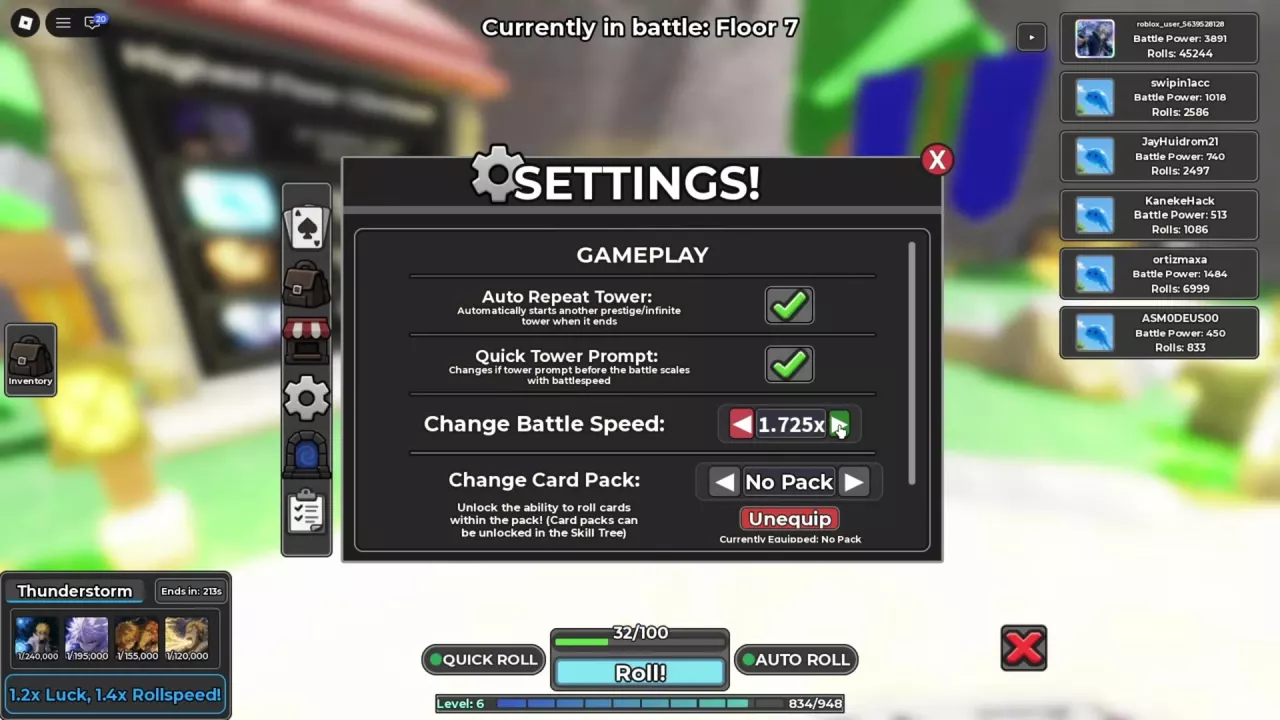
- Open Inventory and select the gear icon to open Settings.
- Find Change Battle Speed under Gameplay.
- Use the right arrow to increase the selected speed or the left arrow to lower it.
You can adjust this setting while a battle is running.
Choose Battle-Speed Upgrades
| Upgrade | Battle-speed benefit | Requirement |
|---|---|---|
| Combat Training I | +15% | Purchase the skill for 1 SP |
| Mystical Arrow | +5% | Equip the charm |
| Eternal Gate of Truth | +20% | Equip the charm |
| VIP | 1.5× | Own the VIP pass; its Roblox listing is marked off sale |
For an SP upgrade, start with Combat Training I. Talk to Hashirama, choose Learn, and select the node in the Skill Tree. Combat Training II costs 3 SP; open its node to read the effect before spending points. See the Skill Tree guide for other SP choices.
For equipment, use Mystical Arrow if you already own it, or work toward Eternal Gate of Truth for the larger battle-speed bonus. Open Items → Charms, select the charm, and choose Equip to activate its bonuses. The charms guide covers crafting and equipment choices.
VIP provides a permanent benefit for owners. See the gamepass comparison for its other benefits and purchase conditions.
Speed Up Tower Prompts
In Settings → Gameplay, enable Quick Tower Prompt to make the prompt before a tower battle scale with your battle speed. Use it alongside a faster battle-speed setting to shorten the wait before combat.
Auto Repeat Tower controls a different part of the run: it automatically starts another Infinite Tower or Prestige Tower run after the current run ends. Floors already advance continuously within a run. Enable Auto Repeat Tower when you want repeated runs, and use the Infinite Tower guide for starting, pausing, and ending a climb.