
Find the Entrance and Start a Run
- Open Deck and equip your battle cards before entering.
- Find the Highest Floor Climbed leaderboard and follow the stone path beside it to the round brick tower. Look for the wooden door with lamps on either side.
- Approach Hisoka, press E / Talk, and select Enter.
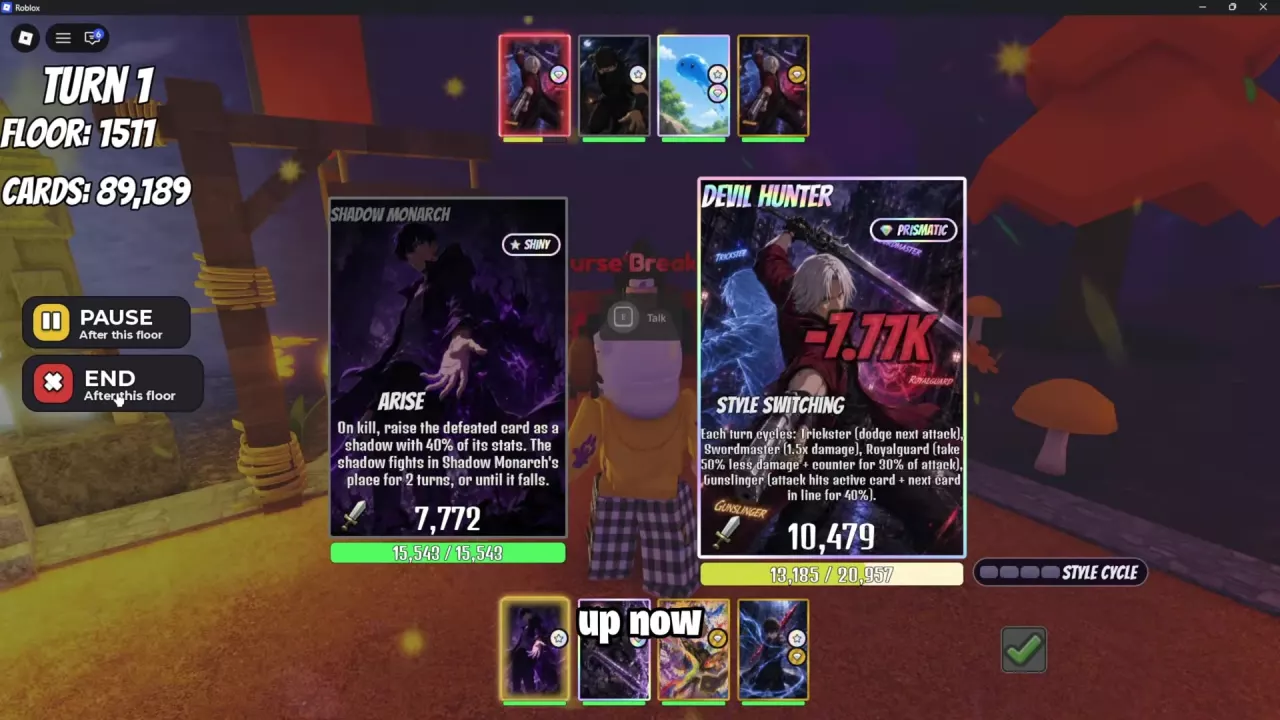
- Watch the battle display for your current floor as the climb begins.
If the entrance dialogue is labeled Weird Dude, use E / Talk → Enter there. Nah dismisses the offer.
For help arranging Party and Support, use the team-building and card-order guide. If you are choosing which abilities to build around, compare the tower ability recommendations.
Continuous Floors and Auto Repeat Tower
During an active run, winning a floor moves the climb forward automatically. You do not need to toggle the tower off and on between floors. Auto Repeat Tower controls what happens after the entire run ends: it starts another run.
- Open Settings with the gear icon in the Inventory sidebar.
- Enable Auto Repeat Tower if you want repeated runs. Disable it when you do not want the next run to start automatically.
- Under Gameplay, use the arrows beside Change Battle Speed to adjust combat speed.
- Enable Quick Tower Prompt to make the pre-battle tower prompt scale with battle speed.
Auto Repeat Tower applies to both Infinite Tower and Prestige Tower. For the other tower's progress and checkpoint system, see the Prestige Tower guide.
Battle speed and prompt timing help shorten the climb's waiting time. Compare the skills and equipment that affect combat speed in the battle-speed guide.
Pause, Resume or End the Run
Open the current floor's battle view to access the run controls. Choose the action that matches what you want to do:
| Action | What to do | Result |
|---|---|---|
| Pause the climb | Select Pause. If it says After this floor, let the current floor finish. | Interrupts the climb so you can continue it later. |
| Resume the climb | Return to Hisoka at the tower entrance and choose Enter. | Continues the paused run. |
| Finish the run | Select End. If it says After this floor, let the current floor finish. | Ends the run and opens its settlement. |
Some battle screens label their exit action GIVE UP. Use Pause when your goal is to keep the climb available to resume.
Change a locked team
A team currently climbing can appear locked in Deck. Pause or end its battle and wait for the current floor to finish before reorganizing Party and Support. A locked team may also offer Copy and Edit; treat that as editing a copy rather than an immediate swap of the team already fighting. See team building for equipment and card-order choices.
Roll and Use Menus During the Climb
You can move around the lobby, talk to NPCs, open menus, and keep Auto Roll and Quick Roll running while tower battles progress. Hiding the battle cards does not pause or end the run. If your interface displays Currently in battle: Floor N, use that banner to track the climb while outside the battle view.
Starting a separate Boss fight depends on the battle interface:
- If the challenge returns Cannot battle, you are already in one!, finish or end the active battle before starting that challenge. Closing its battle view will not clear the conflict.
- If BATTLES lists separate active fights, a Boss battle and Infinite Tower can run together. Use those separate entries to distinguish their progress.
Read Run Results and Improve Drops
When Run ended appears, read Floors cleared for the completed run's result. Scroll through the card list; repeated entries can carry quantity labels such as x2 or x3. With repeat runs enabled, the active battle can already be climbing again from Floor 1 while you inspect the previous result.
The card list is not a tower drop-rate table: do not treat every listed card as a tower item drop or use its printed rarity as a tower drop probability.
Choose a drop boost
| Boost | Effect | How to use it |
|---|---|---|
| Scavenger I | +15% tower drop rate | Talk to Hashirama, choose Learn, and spend 3 SP on Scavenger I in the Skill Tree. |
| Bonus Drops! | Each Infinite Tower item drop has a 50% chance to double while the pass is active. | Applies to item-drop quantity. The Roblox pass listing marks it as not for sale. |
Scavenger I is the SP option for improving tower drop rate. Bonus Drops! affects the quantity of an item that drops; its 50% chance does not mean every item has a 50% chance to drop. For other paid effects and purchase choices, see the gamepass comparison.
Use the crafting materials guide to find what your materials make and how many a recipe needs. For climb objectives and reward claims, follow your named task in Quests and Journey milestones.