
Turns, Health and the Next Card in Line
Combat proceeds automatically through turns. The large cards identify the current matchup, while the team queue and its health bars help you follow who is still alive and who comes next.
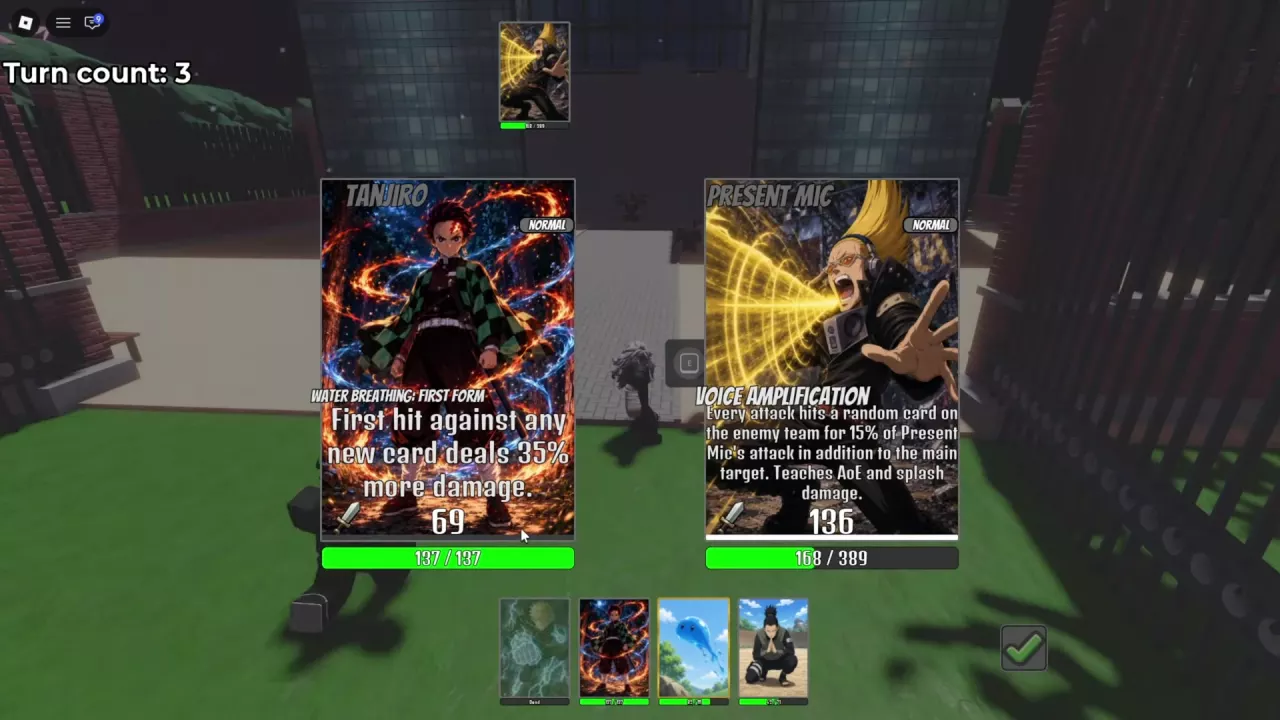
- Turn count: Track the battle’s progress and distinguish a new turn from a card entering the fight.
- Attack and HP: Read the displayed attack value alongside current and maximum HP. Remaining HP tells you how close a card is to falling.
- Team queue: When the active card dies, the next teammate enters and continues the encounter.
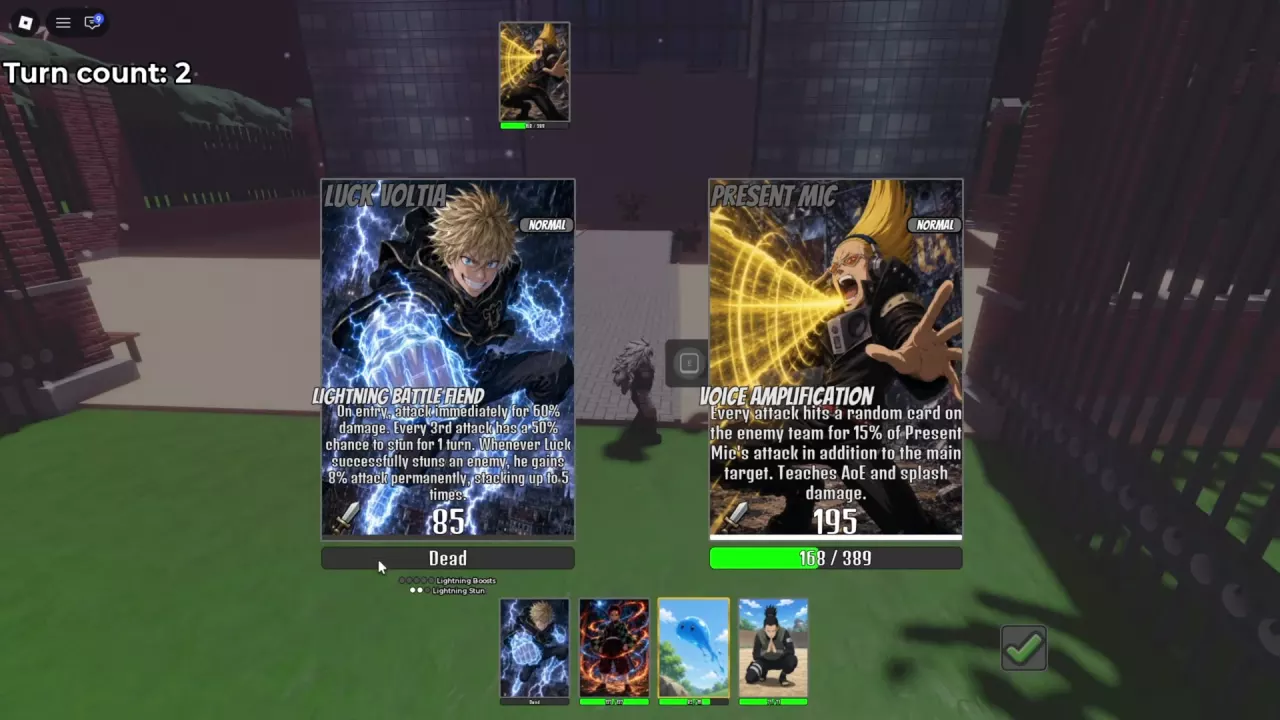
A queue handoff can look like this: Luck Voltia is marked Dead on turn 2 against Normal Present Mic, then Tanjiro enters on turn 3. Losing the front card can therefore leave the rest of your party fighting.
Boss encounters use results such as Battle Won and Battle Lost. Tower summaries can instead show Run ended and Floors cleared, so read the result in the context of the challenge you entered.
To arrange which cards enter next and how their effects work together, use the team building and card order guide.
Entry, Attack, Kill and Death Triggers
Read the condition attached to an ability to understand when it activates. An entry hit, an effect tied to an attack count, and a reaction to being attacked have different triggers.
| Trigger | Card or support | What happens |
|---|---|---|
| On entry | Normal Luck Voltia — Lightning Battle Fiend | Immediately attacks for 60% damage. |
| Every third attack | Normal Luck Voltia — Lightning Battle Fiend | Has a 50% chance to stun for one turn. Each successful stun permanently increases its attack by 8%, up to five stacks. |
| After a kill | Shiny Shadow Monarch — Arise | Revives the defeated card as a shadow with 40% of its stats. The shadow fights in Shadow Monarch’s place for two turns or until it dies. |
| When the supported card dies | Normal Rusted Chain | Permanently reduces that card’s killer’s attack by 30%. Its separate maximum-HP bonus is 20%. |
| When attacked | Dragon Sin — Full Counter | Retaliates against the attacker for 30% of Dragon Sin’s own attack. |
These conditions explain why an effect may happen before a regular exchange, after several attacks, or when a card falls. Luck Voltia’s stun chance belongs to every third attack, so counting battle turns alone does not tell you whether that stun should occur.
Ability suppression also matters. Eraserhead’s Erasure disables the opposing card’s abilities for two turns on entry. Account for that silence when following ability triggers, and read attack and HP separately from the ability’s activation condition.
Use the cards and abilities directory to look up a particular card’s version and full effect. For support choices and equipment instructions, see support cards.
Why Cards Behind the Front Can Take Damage
A card can lose HP while another teammate is the active target. Some abilities hit an additional random card, reach the next enemy in line, or damage the whole enemy team.
| Effect | Targets and conditions |
|---|---|
| Normal Present Mic — Voice Amplification | Each attack also hits one random opposing-team card for damage equal to 15% of Present Mic’s attack, in addition to the main target. |
| Prismatic Bone Knight — Sword of Actuation | Each attack also deals 40% piercing damage to the next card in the enemy queue. |
| Prismatic Crimson Warlord — Tengai Shinsei | The entry meteor damages each enemy card for 15% of that card’s own maximum HP, with another meteor every four turns. The meteor effect does not affect Boss NPCs. |
These effects use different targets: a random team card, the next queued card, or every enemy card. Check the attacker’s ability when a waiting teammate loses health.
This also puts cards with effects that last while they are alive at risk. Speedwagon gives all team cards 20% more damage while alive, so damage reaching Speedwagon in the rear can threaten that team bonus before Speedwagon becomes the active fighter. Watch the whole party’s HP when relying on an aura.
For enemy-specific preparation, look up boss abilities and rewards.
Read Battle Power and Active Battle Status
Check Battle Power in Profile
After equipping your party in Deck, open Profile and read Battle Power beside the equipped Party. Use that value alongside each card’s stats and ability conditions when reviewing your team. Entry effects, silence, counters, and damage to queued cards all help explain a matchup beyond the displayed team value.
Handle an already-in-battle message
Returning to the world view lets you move around or inspect menus while combat continues. The Currently in battle indicator identifies the active encounter or tower floor.
If a new boss challenge returns “Cannot battle, you are already in one!”:
- Check which battle or tower run is still active.
- Finish or end that encounter.
- Return to the boss’s Challenge Boss interaction and try again.
This restriction can block an Endeavor challenge while another battle is active. An interface with a BATTLES list can support concurrent encounters, including Infinite Tower and Dragon Emperor at the same time. Use the active entries and any challenge message in your interface to determine whether another fight can begin.
If your goal is to make battles run faster, follow the battle speed settings and upgrades guide.