
Weather Luck and Rollspeed Bonuses
Check the lower-left weather panel for the active weather's name, remaining time, Luck and Rollspeed multipliers, and card previews. Each weather's bonuses apply while that weather is active; use the live countdown to judge how much rolling time remains.
Auto Roll can continue while you move, browse menus, or fight in the tower. Once you have a useful weather window, keep drawing during it. For the unlock and controls, see the rolling and Auto-Roll guide.
Which Weather Should You Keep?
- Keep Goofy for general Luck-focused rolling. Its 5x Luck is the highest of these nine weather types, paired with 1.5x Rollspeed.
- Keep Doodle when you want a strong boost while conserving rerolls. It gives 4x Luck and matches Goofy's 1.5x Rollspeed, making it a useful stopping point.
- Choose between speed and Luck at lower multipliers. Thunderstorm gives 1.4x Rollspeed and 1.2x Luck. Aurora gives 2x Luck, and Galactic gives 2.2x Luck, but both have 1.3x Rollspeed. Thunderstorm favors speed; Aurora and Galactic favor Luck.
- Match the preview to your target card. Galactic can be the better weather to keep when you are targeting Saitama, even with Goofy's higher Luck multiplier. Check the weather card previews before spending another reroll.
For upgrades that support these temporary windows, see how to increase Luck.
Use Weather Reroll
You need a Weather Reroll in your inventory.
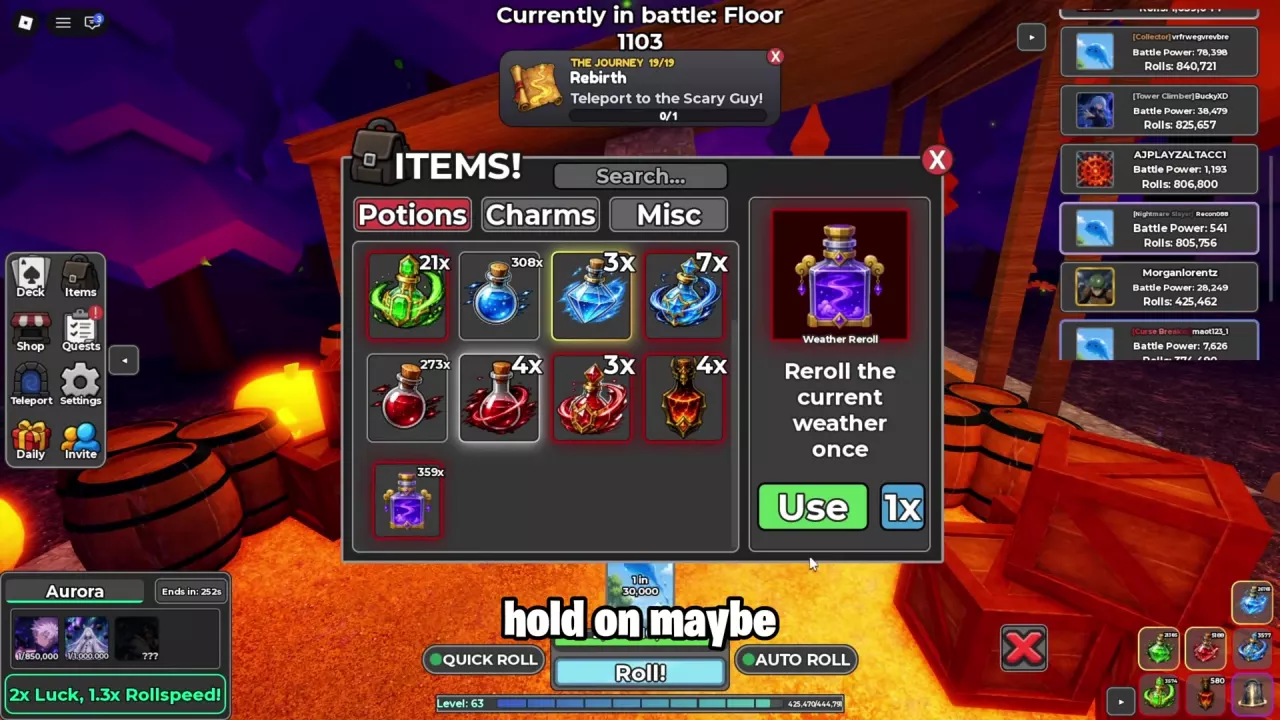
- Open Items and select Potions.
- Select Weather Reroll, the purple-and-gold bottle. Scroll through the inventory if needed.
- Set the use quantity to 1x.
- Press Use to consume one item and randomize the current weather once.
- Check the lower-left weather panel after each use. Stop pressing Use when you get a result you want to keep, then close the inventory and continue rolling.
A reroll can return the same weather. Sandstorm, Aurora, and Galactic can repeat, and another use still spends an item. A repeated Sandstorm result can also refresh its countdown.
Weather Reroll is also listed in the Potions tab of the Charms / Potions crafting window.
Galactic Targets and Weather Card Previews
For Saitama, look for the bald character wearing a pale cape in the Galactic weather preview. That preview carries a 1 in 2,500,000 label. Use the character's appearance and preview label together to identify your target.
Other preview cards can be recognized by their artwork and labels:
| Weather | Card appearance | Preview rarity label |
|---|---|---|
| Galactic | Long-haired figure surrounded by blue-purple light | 1 in 650,000 |
| Doodle | Monochrome sketch of a black-haired character | 1 in 3,500,000 |
| Doodle | Rough drawing of an angry square face | 1 in 4,500,000 |
| Doodle | Dark face with horn-like points and pale eyes | 1 in 5,500,000 |
| Doodle | Blond character against a gold-and-blue background | 1 in 7,000,000 |
These numbers are the labels on the weather previews. For named card abilities and variant-specific attributes, use the card directory.
Activate Potions After Choosing the Weather
Choose the weather first so you spend the overlapping weather and potion timers drawing cards.
- Finish rerolling and keep your preferred weather.
- Check its remaining countdown.
- Activate your Luck potions, then keep rolling during the overlapping bonuses.
With Doodle active, you can use Luck Potion III followed by Luck Potion IV during the same weather window. Doodle's own bonuses remain 4x Luck and 1.5x Rollspeed; Current Luck in Profile reflects your combined setup.
See potion effects and durations to choose which potions to spend on the window.