Card Battles: Prestige Cards, Abilities and Variants
Last updated:
25 objects
Battle card abilities, conditional stats, variant labels and collection targets.
Luck Voltia
Version
Normal
Preview rarity: 1 in
12000
(Normal)
Bleed and Piercing Blood
Immediately attacks on entry for 60% damage. Every third attack has a 50% chance to stun for one turn. Each successful stun permanently increases its attack by 8%, up to five stacks.
(Normal)
Attack
85
(Normal card in the early Deck and boss configuration)
Health
169 HP
(Normal card in the early Deck and boss configuration)
Collection context
—
More details
Entry attack damage
60 %
(On entry)
Stun chance
50 %
(Every third attack)
Stun duration
1 turn
(Successful stun)
Attack gain per stun
8 %
(Successful stun)
Attack-gain stack limit
5 stacks
Rock Lee
Version
Normal
Preview rarity: 1 in
500
(Normal)
Bleed and Piercing Blood
Opens a gate every three turns, permanently gaining 25% attack. After three gates are open, loses 10% maximum HP each turn.
(Normal)
Attack
32
(Early Normal configuration)
Health
64 HP
(Early Normal configuration)
Collection context
—
More details
Gate interval
3 turns
Attack gain per gate
25 %
Maximum HP lost per turn
10 %
(After opening three gates)
Soma Schicksal
Version
Normal
Preview rarity: 1 in
200
(Normal)
Bleed and Piercing Blood
Recovers 15% maximum HP each time it is attacked.
(Normal)
Attack
25
(Early Normal configuration)
Health
49 HP
(Early Normal configuration)
Collection context
—
More details
Maximum HP recovered
15 %
(Each time attacked)
Mumen Rider
Version
Normal
Preview rarity: 1 in
3
(Normal)
Bleed and Piercing Blood
While alive, all Party cards take 15% less damage. After death, the next entering card deals 10% more damage for two turns.
(Normal)
Attack
7
(Early Normal configuration)
Health
13 HP
(Early Normal configuration)
Collection context
—
More details
Party damage reduction
15 %
(While alive)
Next entrant's damage bonus
10 %
(For two turns after Mumen Rider dies)
Mimic Chest
Version
Normal
Preview rarity: 1 in
40
(Normal)
Bleed and Piercing Blood
On death, has a 50% chance to damage the enemy for 75% of its own attack, or a 50% chance to inflict a 40% damage effect on the next allied card.
(Normal)
Attack
15
(Early Normal configuration)
Health
30 HP
(Early Normal configuration)
Collection context
—
More details
Enemy-damage outcome chance
50 %
(On death)
Damage based on own attack
75 %
(Enemy-damage outcome)
Ally-damage outcome chance
50 %
(On death)
Tanjiro
Version
Normal
Preview rarity: 1 in
6000
(Normal)
Bleed and Piercing Blood
The first attack against each new opposing card deals 35% more damage.
(Normal)
Attack
69
(Early Normal boss-fight configuration)
Health
137 HP
(Early Normal boss-fight configuration)
Collection context
—
More details
First-hit damage bonus
35 %
(First attack against each new opposing card)
Gon
Version
Normal
Preview rarity: 1 in
50000
(Normal)
Bleed and Piercing Blood
Below 30% HP, the next attack deals 2.2× damage. Gon dies at the end of that turn.
(Normal)
Attack
130
(Normal tower-party configuration)
Health
259 HP
(Normal tower-party configuration)
Collection context
—
More details
HP threshold
30 %
(Triggers below this threshold)
Next-attack multiplier
2.2 ×
(Below 30% HP)
Speedwagon
Version
—
Preview rarity: 1 in
25000
(Early tower-party card)
Bleed and Piercing Blood
All team cards deal 20% more damage while Speedwagon is alive.
Attack
—
Health
—
Collection context
—
More details
Team damage bonus
20 %
(While alive)
True Hero
Version
Cosmic
(Early Cart Titan fight)
Preview rarity: 1 in
—
Bleed and Piercing Blood
While alive, the team takes 15% less damage. After death, the next entering card deals 10% more damage for two turns.
(Cosmic)
Attack
111
(Cosmic card in the early Cart Titan fight)
Health
222 HP
(Cosmic card in the early Cart Titan fight)
Collection context
—
Young Spirit Vessel
Version
Prismatic
Preview rarity: 1 in
1400000
(Prismatic)
Bleed and Piercing Blood
Summons a shadow clone to dodge the first attack.
(Prismatic)
Attack
354
(Prismatic card in the early two-copy party)
Health
708 HP
(Prismatic card in the early two-copy party)
Collection context
—
Crimson Warlord
Version
Prismatic
(Prestige Tower encounter)
Preview rarity: 1 in
—
Bleed and Piercing Blood
On entry, each enemy card takes damage equal to 15% of its own maximum HP; this meteor effect does not affect Boss NPCs. Another meteor falls every four turns. Attacks deal 1.3× damage, and incoming damage is reduced by 20%.
(Prismatic)
Attack
—
Health
—
Collection context
—
More details
Enemy maximum-HP damage
15 %
(Entry meteor; ineffective against Boss NPCs)
Meteor interval
4 turns
Attack damage multiplier
1.3 ×
Damage reduction
20 %
Copyblade Mentor
Version
Shiny
(Boss and tower examples)
Preview rarity: 1 in
—
Bleed and Piercing Blood
Temporarily copies an opponent's ability. Examples include Dragon Form / Thunder Bagua, Bankai: Hakka no Togame, and Sword of Actuation.
(Shiny)
Attack
2394
(Dragon Emperor fight while copying Dragon Form / Thunder Bagua)
Health
4787 HP
(Dragon Emperor fight while copying Dragon Form / Thunder Bagua)
Collection context
—
More details
Copy time remaining
5 turns
(Dragon Emperor fight example)
Copy time remaining
4 turns
(Prestige Tower example copying Ice Reaper)
Copy time remaining
6 turns
(Floor 5 example copying Bone Knight)
Copied Dragon Form / Thunder Bagua
Above 50% HP, reduces damage by 30%. Below 50% HP, loses that reduction and doubles attack. Attacks have a 25% chance to stun for one turn. On death, damages the killer for 35% of the killer's maximum HP.
(Dragon Emperor copy example)
On death, freezes the enemy card for three turns and permanently reduces its attack by 30%.
(While copied by Shiny Copyblade Mentor)
Attack
—
Health
—
Collection context
—
More details
Freeze duration
3 turns
(On death)
Permanent enemy attack reduction
30 %
(On death)
Mimic
Version
Prismatic
(Prestige Tower encounter)
Preview rarity: 1 in
—
Bleed and Piercing Blood
On death, has a 50% chance to damage the enemy for 75% of its own attack, or a 50% chance to inflict a 40% damage effect on the next allied card.
(Prismatic)
Attack
—
Health
—
Collection context
—
The Dancer
THE DANCER
Version
Prismatic
Preview rarity: 1 in
—
Bleed and Piercing Blood
Deals 15% more damage to cards with higher stats. Every third attack is a guaranteed critical hit for 2× damage.
(Prismatic)
Attack
3886
(Prismatic Deck configuration)
Health
7771 HP
(Prismatic Deck configuration)
Collection context
—
More details
Damage bonus
15 %
(Against cards with higher stats)
Guaranteed critical interval
3 attacks
Critical damage multiplier
2 ×
(Every third attack)
Shadow Monarch
Version
Shiny
(Ability and Floor 1511 examples)
Preview rarity: 1 in
40000000000
(Shiny Deck card associated with the Floor 1511 example)
4000000000
(Separate collection variant)
Bleed and Piercing Blood
After a kill, revives the defeated card as a shadow with 40% of its stats. The shadow fights in Shadow Monarch's place for two turns or until it dies.
(Shiny)
Attack
—
Health
—
Collection context
—
More details
Defeated card's stats retained
40 %
(Summoned shadow)
Maximum shadow duration
2 turns
(Ends sooner if the shadow dies)
Bone Knight
Version
Prismatic
Preview rarity: 1 in
2800000000
(Prismatic Deck card)
Bleed and Piercing Blood
On entry, reduces enemy attack by 25% and maximum HP by 15%. Each attack also deals 40% piercing damage to the next card in the enemy queue.
(Prismatic)
Attack
14664
(Prismatic card during the Floor 1032 fight; combat configuration value)
Health
—
Collection context
—
More details
Enemy attack reduction
25 %
(On entry)
Enemy maximum-HP reduction
15 %
(On entry)
Next-enemy damage
40 %
(Each attack)
Dragon Sin
Version
Shiny, Gold
(Early Infinite Tower enemy)
Preview rarity: 1 in
2000000000
(Deck variant associated with the later tower sequence)
200000000
(Collection variant after the Floor 1032 run)
Bleed and Piercing Blood
When attacked, retaliates against the attacker for 30% of Dragon Sin's own attack.
Attack
10
(Early Shiny Gold tower enemy)
7295
(Floor 1032 enemy; combat value)
Health
—
Collection context
—
More details
Counter damage based on own attack
30 %
(When attacked)
Young Shadow Heir
Version
Galactic
(Floor 1501 enemy)
Preview rarity: 1 in
300000000
(Separate later collection variant)
Bleed and Piercing Blood
Attacks have a 50% chance to burn the enemy for two turns, causing it to lose 8% maximum HP each turn.
(Galactic combat example)
Attack
—
Health
—
Collection context
—
More details
Burn chance
50 %
(On attack)
Maximum HP lost per turn
8 %
(Burn)
Burn duration
2 turns
Meteor Conqueror
Version
Gold
Preview rarity: 1 in
100000000
(Gold)
Bleed and Piercing Blood
On entry, damages every enemy card for 15% of Meteor Conqueror's own maximum HP. Doubles attack for three turns, then overheats and loses 10% maximum HP each turn.
(Gold)
Attack
—
Health
—
Collection context
—
More details
Own maximum HP used as damage
15 %
(Entry hit against each enemy)
Attack multiplier
2 ×
(First three turns)
Burst duration
3 turns
Maximum HP lost per turn
10 %
(After the three-turn burst)
Devil Hunter
Version
Prismatic
(Floor 1511 enemy)
Preview rarity: 1 in
—
Bleed and Piercing Blood
Cycles styles each turn: Trickster dodges the next attack; Swordmaster deals 1.5× damage; Royalguard reduces incoming damage by 50% and counters for 30% of attack; Gunslinger attacks the current card and deals 40% damage to the next enemy card.
(Prismatic)
Attack
—
Health
—
Collection context
—
More details
Swordmaster damage multiplier
1.5 ×
(Swordmaster)
Damage reduction
50 %
(Royalguard)
Counter based on attack
30 %
(Royalguard)
Next-enemy damage
40 %
(Gunslinger)
Dumb Threeblade Ronin
Version
—
Preview rarity: 1 in
—
Bleed and Piercing Blood
On entry, damages the entire enemy team for 15% of its own attack. Each attack has a 30% chance to also hit the next enemy card for full damage.
(Regional boss-fight configuration)
Attack
—
Health
—
Collection context
—
More details
Entry damage based on own attack
15 %
(Each enemy card)
Extra-hit chance
30 %
(Each attack)
Extra-hit damage
100 %
(Next enemy card on a successful extra hit)
Blood Brother
Version
—
Preview rarity: 1 in
—
Bleed and Piercing Blood
Attacks apply a two-turn bleed for 6% maximum HP per turn. Every four turns, Piercing Blood deals 2× damage and 40% damage to the card behind the target. Heals for 50% of the bleed damage dealt.
(Regional boss-fight enemy card)
Attack
—
Health
—
Collection context
—
More details
Maximum-HP bleed per turn
6 %
Bleed duration
2 turns
Piercing Blood interval
4 turns
Piercing Blood multiplier
2 ×
Backline damage
40 %
(Piercing Blood)
Bleed damage recovered as health
50 %
Saitama
Version
—
Preview rarity: 1 in
2500000
(Bald, caped character in the Galactic weather preview)
Bleed and Piercing Blood
—
Attack
—
Health
—
Collection context
A target for rolling during Galactic weather.
More details
Appearance
Bald character wearing a pale cape.
(Galactic weather preview)
Shaggy
Version
—
Preview rarity: 1 in
—
Bleed and Piercing Blood
—
Attack
—
Health
—
Collection context
Character in the card Index.
More details
Appearance
Brown-haired character wearing a green shirt and brown trousers, surrounded by golden energy.
(Index artwork)
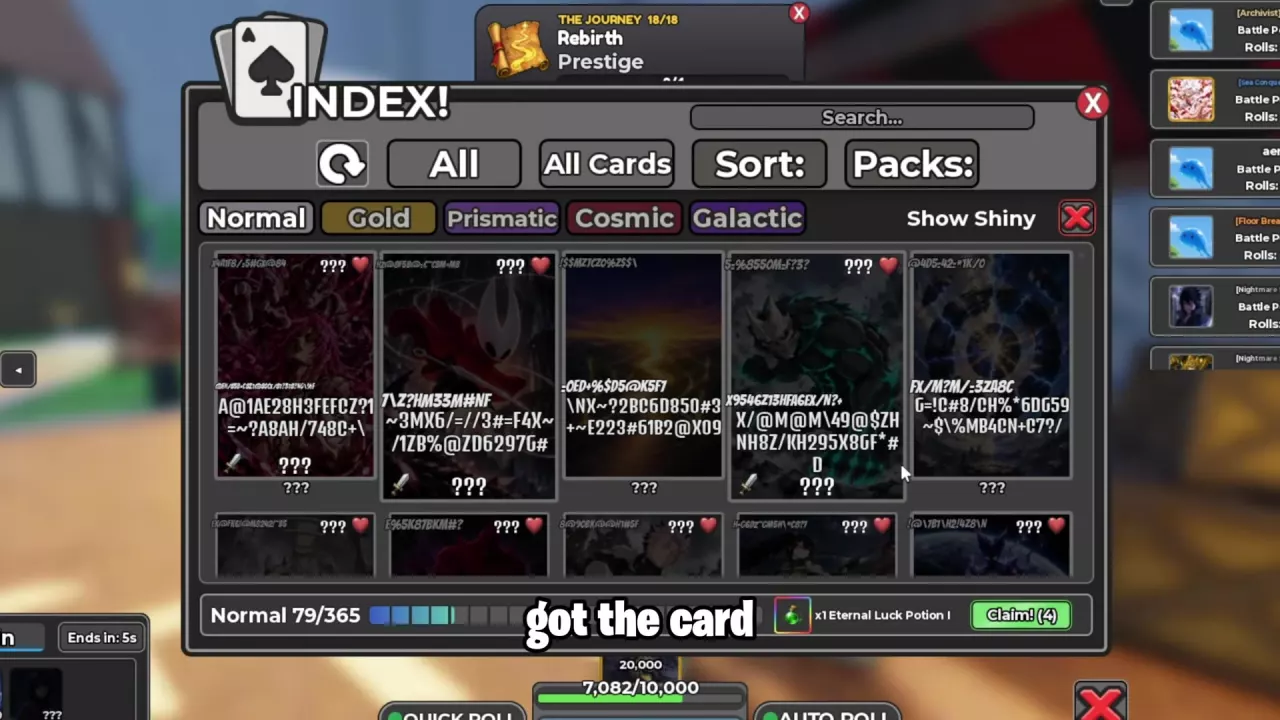
Find a card’s ability, check its version and stat conditions, and learn where to view collection rewards in the Index.
Use the card directory to look up names, abilities and version-specific stats. In-game, open Index to search and filter by version or pack, then select a card for Health, Attack and Ability details. Normal, Gold, Prismatic, Cosmic and Galactic are separate version categories; Show Shiny is an additional switch, and a card can be both Shiny and Gold. Collection rewards appear beside the Claim! button.
Find a Card and Read Its Ability
Search the directory by card name or alias, then filter by version to narrow the results. Open More details on an entry for its full attributes, ability conditions and related cards.
Read Attack, Health and displayed rarity together with their conditions. A value attached to a particular Deck configuration or tower encounter describes that configuration; keep those conditions attached when comparing it with your own card.
For abilities, check when the effect triggers, what it targets, how long it lasts and what it costs. Damage based on the user's maximum HP differs from damage based on the enemy's maximum HP, even when the percentage is the same. Use the trigger guide below to connect those details to your next battle.
Normal, Gold, Prismatic, Cosmic, Galactic and Shiny
The Index has five version categories: Normal, Gold, Prismatic, Cosmic and Galactic. Show Shiny is a separate switch.
Shiny can coexist with another version label. Dragon Sin can carry both Shiny and Gold, so keep both labels when identifying that card or comparing its stats.
Galactic also names a weather condition. Identify a Galactic card by its own version label; use the weather guide for weather bonuses and rolling windows.
Use the Index and Collection Rewards
Open Index to browse your collection.
Enter a card name in Search. Use All, All Cards and Packs to adjust the collection view, and Sort to change its order.
Select Normal, Gold, Prismatic, Cosmic or Galactic. Use Show Shiny when looking for shiny cards.
Select a card to open its Health, Attack and Ability sections.
Look along the bottom of the Index for collection progress, the reward entry and Claim!. Use that button when a reward is available.
The collection reward area includes an Eternal Luck Potion I entry with a quantity of ×1. For potion effects and usage, see the potion guide.
Use Index for card lookup and collection rewards. To change the cards you take into battle, open Deck and follow the team-building guide.
Match Ability Triggers to Your Next Battle
Compare the actual versions and stats you own, then choose effects that can activate against the next opponent.
Entry effects provide immediate value. Luck Voltia attacks on entry, while Bone Knight weakens the opposing card and can damage the next enemy with subsequent attacks. These effects do not require a kill first.
Living auras reward survival. Speedwagon's team damage bonus lasts while it is alive. Mumen Rider provides party damage reduction while alive, then gives the next entrant a short damage boost after death. Their position and survival affect which benefit your team receives.
Kill effects need a finishing blow. Shadow Monarch creates a temporary shadow fighter after a kill. It is a useful way to continue through an enemy queue, but the effect cannot help secure that first kill.
Death effects benefit the cards that follow. Ice Reaper's death freeze and attack reduction can leave an enemy vulnerable for the next ally. Plan the successor around that opening.
Burst damage can consume the card using it. Below 30% HP, Gon's next attack deals 2.2× damage, but Gon dies at the end of that turn. Treat it as a finishing burst when deciding whether to rely on Gon for a longer fight.
Boss exceptions matter. Crimson Warlord's Tengai Shinsei meteor damage does not affect Boss NPCs. Its listed 1.3× attack damage and 20% damage reduction remain separate benefits, so its value against a boss differs from its value against a multi-card tower queue.
Copyblade Mentor depends on the opponent. Sharingan Copy! temporarily copies an enemy ability, including effects such as Dragon Emperor's transformation, Ice Reaper's death freeze or Bone Knight's weakening and backline damage. Read the copied effect and its remaining duration before relying on it for the next exchange.